Tasks
Tasks refer to individual pieces of work or actions that need to be completed as part of a broader process, workflow or operational goal. They help teams stay organized, delegate responsibilities effectively and ensure that no important activity is overlooked.
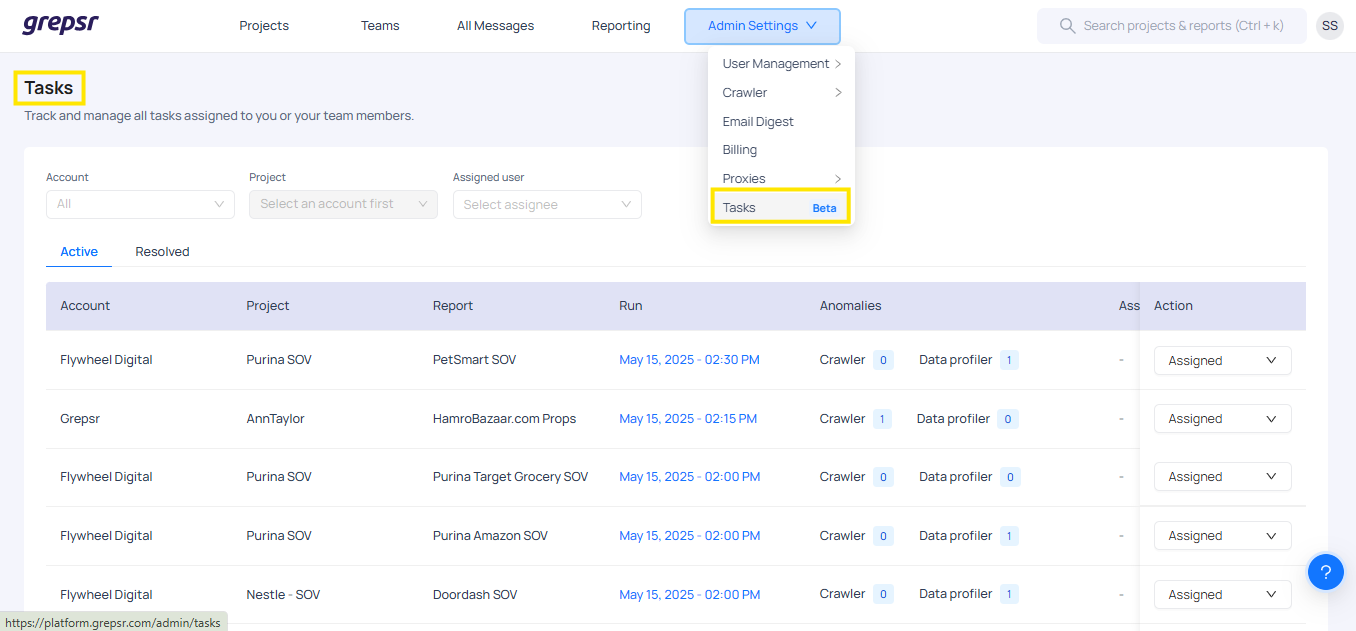
In the Admin Settings of the platform, you'll find a section labeled Tasks.
Managing Tasks
The Tasks section provides administrators and team leads with an overview of all tasks currently in the system. From here, you can:
- Track task progress in real time.
- Assign responsibilities to specific users.
- Organize tasks by project or account.
- Review task history for completed items.
Assigning Tasks
You have the flexibility to assign tasks by choosing:
- Assigned User – Select the team member responsible for completing the task.
- Project – Link the task to a specific project, ensuring it aligns with relevant goals and timelines.
- Account – Associate the task with a particular client or account for better tracking and accountability.
Task Categories
| Categories | Description |
|---|---|
| Active | This tab displays all ongoing or pending tasks. It includes essential details and allows you to quickly see what work is in progress and who is responsible. |
| Resolved | This tab lists all tasks that have been completed or marked as done by the assigned users. It serves as a historical record of completed work. |